
Transaction-Level and Item-Level Expenses
Learn the difference between transaction-level and item-level expense data, and how enrichment links the two.
Every expense Sail classifies starts as either a transaction or an item. This page explains the difference, how enrichment connects them, and why Sail keeps them separate instead of merging everything into one combined view.
What an expense is
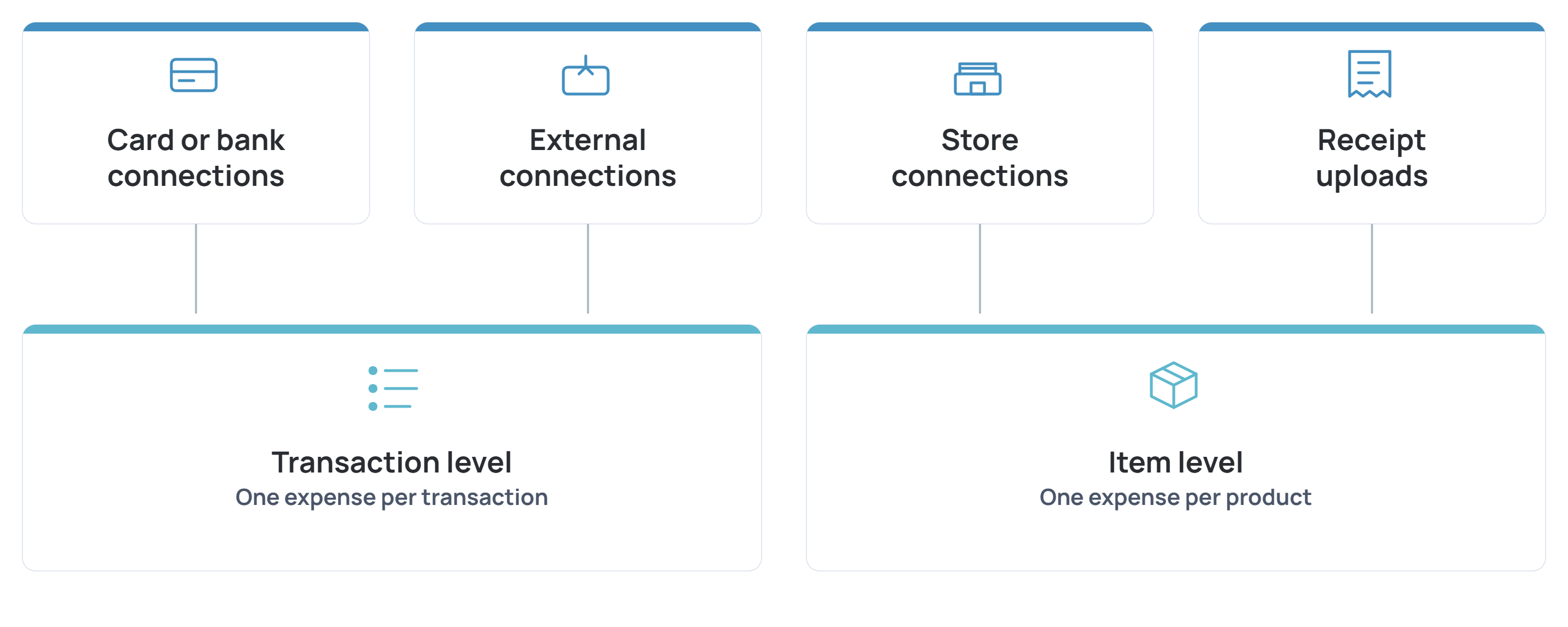
An expense is the core unit Sail works with, a transaction or a purchased item that Sail classifies for Section 213(d) eligibility. Every expense comes from one of four sources (source_type):
- A card or bank connection
- A store connection
- A pushed external transaction
- An uploaded receipt
Which source produced an expense determines whether you get transaction-level or item-level detail. See the full field list in List Expenses.
Transaction-level data
A card or bank connection reports one expense per transaction, the same level of detail your bank statement shows:
- A store
- A date
- An amount
On the Expense object, this shows up as origin.type: transaction, with origin.detail carrying the raw bank descriptor (for example, WALGREENS #4821 RX).
Transaction-level data tells you that a purchase happened and where, but not what was actually bought. A $49.00 charge at Walgreens could be a prescription, a birthday card, or both in the same basket. That ambiguity is part of what drives some expenses into itemization_required during classification. See Classifying Item-Level Expenses for all four classification outcomes.
Item-level data
A store connection, where a user logs into a store directly through Sail's Connect Account Widget (Amazon, Walgreens, Target, CVS, Walmart, and Costco, among others), reports individual products instead of one transaction total. The same is true for a receipt upload once it's processed. On the Expense object, this shows up as origin.type: product, with origin.detail carrying the product title.
Item-level data resolves the ambiguity transaction-level data can't. Sail classifies each item on its own, so a prescription and a birthday card from the same store visit no longer have to share one eligibility outcome.
How enrichment links the two
When a card or bank transaction's store is one Sail can also connect to directly, the expense's merchant.supported_merchant_id field is set (for example, mer_costco). A non-null supported_merchant_id is the signal to prompt the user to connect that store. Connecting it supplies item-level detail for the purchases already recorded at that store, including any expense sitting in itemization_required, and for future purchases there. The same signal applies to transactions you push yourself through an external connection. Connecting a matching store account enriches your pushed data with item-level detail too.
Whether that item-level data comes from a store connection or from an itemized receipt, the resulting item-level expenses carry parent_expense_id, pointing back to the original transaction-level expense they enriched. See Classifying Item-Level Expenses for when itemization is required.
Why Sail keeps them separate
Sail doesn't merge a transaction and its item-level detail into one combined record. Each stays its own expense, connected only through supported_merchant_id or parent_expense_id. This is deliberate. A flat, item-level view lets you classify at whatever level of detail you actually have, without waiting for every source to be connected before anything becomes usable.
Data sources at a glance
Because each source stays separate rather than merging into one record, here's exactly what each one produces on its own.
Source (source_type) | Produces | Connected through |
|---|---|---|
card | Transaction-level | A card or bank connection |
store | Item-level | A store connection |
external | Transaction-level, unless enriched | A pushed transaction, through your own external connection |
receipt_upload | Item-level | An uploaded receipt |
Next steps
- To connect a user's card, bank, or store accounts and start retrieving expenses, see Enrich Transactions with Item-Level Data.
- To see how Sail classifies an expense's HSA/FSA eligibility, see Classifying Item-Level Expenses.
- To see the three kinds of account connections Sail supports and what each produces, see Account Connections.
Updated 14 days ago