
What Sail Does
Learn more about Sail, and decide how to use it for your use case.
Sail is an intelligence layer for spending data. It connects a user's accounts, turns each purchase into the individual items inside it, classifies each item, and lets you act on the result, for example by reimbursing the user.
Each of these is a separate API, so you can use only the one you need, or combine them.
What you can do with Sail
Sail answers the questions that come up once a user's spending is in one place, like what they actually bought, whether it qualifies, and what's in their Health Savings Account (HSA) or Flexible Spending Account (FSA). Each API below answers one of them.
Connect a user's store accounts to see what they actually bought. This turns a flat transaction, like a single $49 charge at a pharmacy, into the individual items inside it, each one priced and categorized on its own.
This is for you if you already show users their spending and want the items behind each purchase.
Connect a user's HSA or FSA administrator to read their balance, contribution progress, account activity, and deposit details. It's also what makes reimbursing a user from their own account possible.
This is for you if you want to show users their HSA/FSA balance and activity, or need their account and routing numbers to make deposits.
Send the transaction data you already have and get back whether each expense qualifies under Section 213(d) of the US tax code. It runs server-to-server, with no user-facing step.
This is for you if you already have your end users' transactions and need to know which ones qualify.
If you only need item-level data, you can go straight to What Is the Itemize Transaction API?. The rest of this page explains how Sail works with HSAs, FSAs, and eligibility.
Sail for consumer-directed healthcare
Healthcare spending happens across a lot of disconnected places, like credit cards, bank accounts, a login at a pharmacy or store, and, for many people, an HSA or FSA sitting untouched in between. Sail connects that spending, works out which of it qualifies for tax-advantaged healthcare treatment, and gives an application one place to build on top of it.
How eligibility works
Sail classifies every expense it holds against Section 213(d) of the US tax code and IRS Publication 502, the same rules HSA, FSA, and HRA administrators use. For expenses Sail already holds, it happens automatically, so there's no separate step to call.
The decision is made per item, not per basket, so a prescription and a birthday card from the same store visit get separate outcomes instead of one shared verdict. When an expense can't be decided from the total alone, Sail returns itemization_required until item-level detail is supplied.
How you use the result depends on what you're building. If you only need to know what qualifies, the outcome is the answer you act on. If you're reimbursing users, it's also the gate a reimbursement has to clear, since only an eligible expense can be reimbursed.
How it fits together
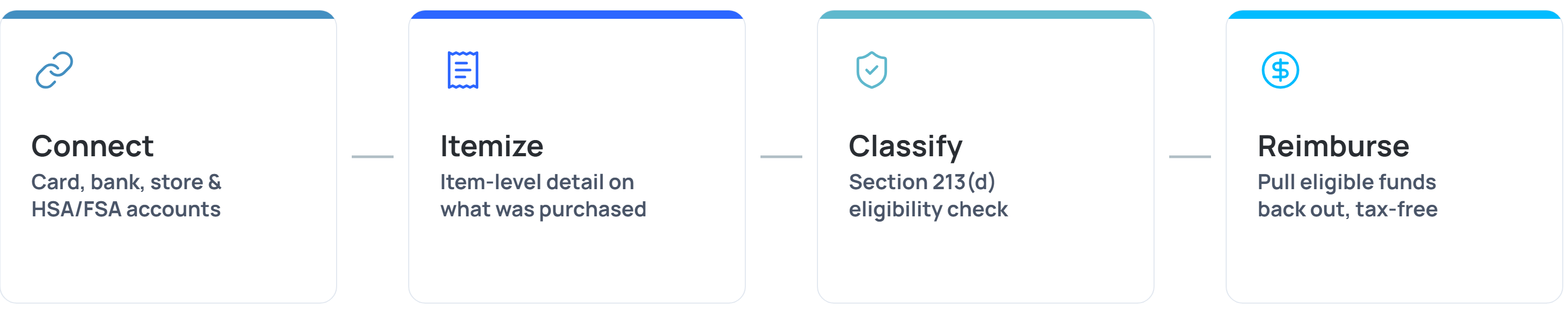
A purchase goes in, whether it's a card swipe, a receipt, or an item on a store shelf, and Sail turns it into expenses, one for each product in the basket. Each expense is checked against Section 213(d) the moment it arrives, so you always know if it's eligible, ineligible, or needs more before it can be. From there, an eligible expense can go one step further. Sail reimburses the user straight from their own HSA or FSA, tax-free, and tracks that reimbursement until the money actually lands.
Your use case sets where Sail starts and ends, from the item-level data, to the eligibility answer, to the reimbursement. Each of those is a complete, supported integration, not a partial one.
Next steps
- To pull your first item-level expenses, see the Get Item-Level Expenses quickstart.
- To classify transactions you already have, see Classify Your Transactions.
- To connect an administrator and read a balance, see the Read an HSA/FSA Balance quickstart.
- To understand how eligibility is decided, see Expense Classification.
- To reimburse a user from their own HSA/FSA, see Reimbursement.
Updated 16 days ago